
Bing Search API Key in 2026: It's Retired. Use These Instead

On this page
The Bing Search API v7 was retired on August 11, 2025. If you found this page Googling for “how to get a Bing Search API key,” the short answer is that you can’t: the API doesn’t exist anymore. The path forward depends on what you actually needed Bing data for.
This guide covers what happened to the API, Microsoft’s official replacement (and why it’s typically the wrong answer), the five real third-party alternatives, and what to do with the legacy v7 code that’s still in production at thousands of companies.
Can you still get a Bing Search API key?
No, and the reason matters for your migration. There is no supported way to generate a new Bing Search API key in 2026, and any key issued before retirement no longer returns data.
How you used to get a Bing Search API key
Before the shutdown, getting a Bing Search API key meant provisioning a “Bing Search v7” resource in the Azure Portal. You created the resource, opened its Keys and Endpoint blade, and copied one of the two subscription keys into the Ocp-Apim-Subscription-Key request header. The F1 free tier included 1,000 transactions per month. Paid S-tiers billed per 1,000 transactions above that.
Microsoft disabled new Bing Search resource creation in February 2025. From that point you could no longer generate a fresh Bing Search API key at all. Any Bing Search API key provisioned earlier kept working only until August 11, 2025, when the endpoints began returning HTTP 410 Gone. So if your goal today is simply to get a Bing Search API key, there is no supported path. The rest of this guide covers what to use instead.
Azure rejects new Bing resources with an ApiSetDisabledForCreation error (worldestroyer on r/AZURE, May 2025):
I read the documentation, and everything seemed fine, but when I went to actually create the resource I kept getting an error back
How to get an API key for a replacement
The key you need now comes from the replacement you pick. Each third-party SERP API in this guide issues its own key when you create an account, with no Azure resource to provision; SerpApi takes it as the api_key parameter shown in the migration code below. Grounding with Bing Search is the exception: it needs an Azure subscription and a Grounding with Bing resource, and the keys sit on that resource in the Azure portal.
Timeline: how the retirement happened
The shutdown moved faster than most enterprise migrations. Per bitbasti’s coverage and PPC Land’s analysis:
| Date | Event |
|---|---|
| February 2025 | Microsoft quietly disabled new resource creation for Bing Search v7 in Azure |
| May 13, 2025 | Microsoft formally announced retirement of Bing Search v7 and Custom Search APIs |
| August 11, 2025 | Public endpoints stopped responding — return HTTP 410 Gone |
Two days of formal notice between the May announcement and a sweeping public-API shutdown was unusually aggressive even by hyperscaler-deprecation standards. Per Windows Forum’s analysis, the abrupt timeline left many enterprise teams scrambling to migrate production workloads with little planning runway.
What Microsoft says you should use instead
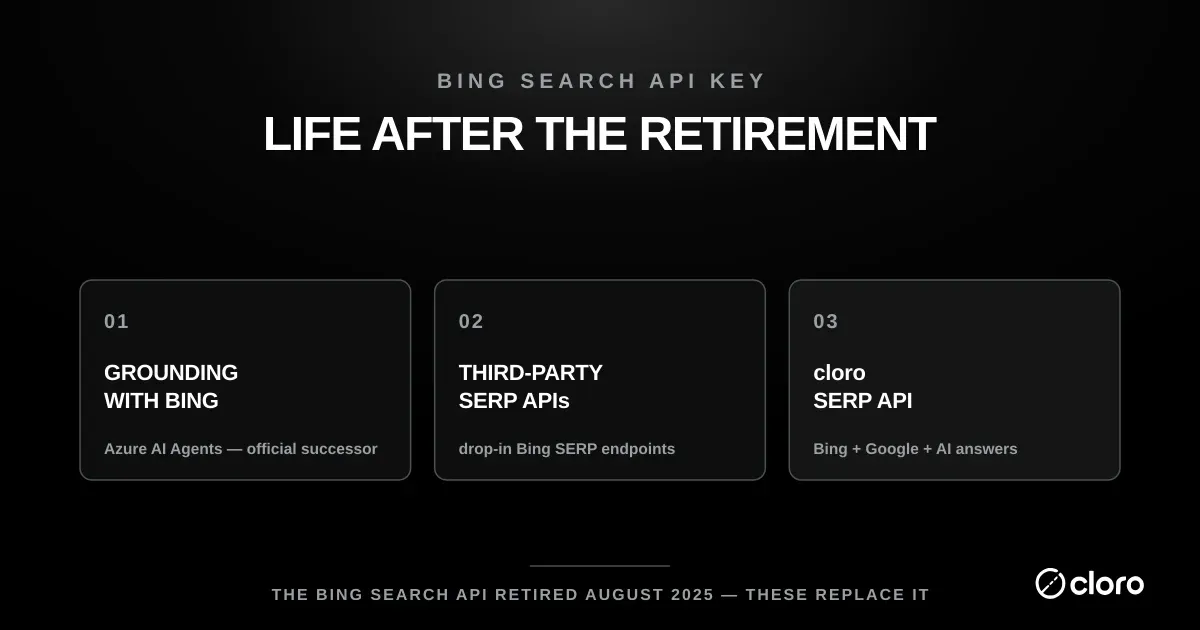
The official replacement is Grounding with Bing Search, a feature inside the Azure AI Agent Service. Per Searchcans’s 2026 retirement guide, it returns Bing-grounded results to AI agents, not direct SERP JSON. The architectural differences from v7:
- Agent-shaped, not SERP-shaped. Grounding returns search results consumed by a Microsoft-managed AI agent that answers a query, rather than letting you pull the raw SERP and process it yourself.
- Requires the full Azure Agents framework. Resource provisioning, role assignments, agent configuration, region selection, none of which v7 required for a simple
GET /searchcall. - 40-483% more expensive depending on workload per PPC Land’s pricing analysis. Smaller-volume callers see the larger percentage increase.
- The underlying Azure OpenAI Assistants API is itself deprecated, with a hard retirement date of August 26, 2026 and developers pointed to Microsoft’s Foundry Agents service (built on the Responses API). The official replacement runs on a platform that is itself being replaced on the same timeline.
For teams that just want Bing SERP JSON (the actual v7 use case), Grounding with Bing Search is structurally the wrong tool. It’s an AI-agent platform, not a search API. The realistic migration path for most teams is a third-party SERP API.
The 5 real Bing Search API alternatives in 2026
| Vendor | Best for | Bing parsing | Other engines | Starting price |
|---|---|---|---|---|
| SerpApi | Broadest engine catalog | ✅ | 80+ engines incl. Google, Baidu, Yandex, YouTube | $75/mo (5k searches) |
| DataForSEO | Lowest SERP rate at scale | ✅ | Google, Bing, Yahoo, Yandex, Baidu, more | $2/1k |
| SERPHouse | Bing SERP on a free plan, then a low monthly | ✅ | Google, Bing, Yahoo | Free (4k credits), then $29.99/mo ($0.75/1k SERP requests) |
| Brave Search API | Independent index alternative | n/a (own index) | Brave’s 30B+ page index | $5/1k ($5 monthly credits) |
| Firecrawl | AI-application curated search | partial | Curated authoritative-source index | Flat predictable pricing |
The five split on whether you need actual Bing SERP data (SerpApi, DataForSEO and SERPHouse do; Brave and Firecrawl substitute different indices). Below the table, cloro is a different category answer: it doesn’t scrape Bing, it covers the AI search surfaces where many Bing-style use cases have migrated.
1. SerpApi: best for breadth across vertical engines
Per SerpApi’s documentation, the Bing endpoint returns parsed JSON for organic, ads, news, image, and video results. SerpApi’s bigger value is the catalog: 80+ search engines under one auth, including Bing alongside Baidu, Yandex, Naver, eBay, YouTube, Amazon, and Walmart. For buyers evaluating SerpApi against managed competitors at production volume, see our SerpApi alternatives breakdown.
Pricing: Developer $75/month (5,000 searches, $15/1k effective). Production $150/month (15,000 searches). Higher tiers reduce the per-search rate.
2. DataForSEO: best low base rate at production scale
DataForSEO’s SERP API covers Bing alongside Google, Yahoo, Yandex, Baidu, Naver, and others. The September 2025 SERP-API price cut took the base rate down roughly 80%; Live mode now runs $2/1k. AI Overview enrichment ($2 → $4 on first page) doesn’t apply to Bing (no AIO equivalent on Bing).
Pricing: Pay-as-you-go at $2/1k in real time. No monthly minimum.
See our DataForSEO alternatives breakdown for the full DataForSEO trade-off analysis.
3. SERPHouse: Bing, Google and Yahoo behind a free plan
SERPHouse parses Bing directly and splits the verticals into their own endpoints: Bing SERP returns organic results, People Also Ask, carousels, the knowledge panel and related searches as JSON, with separate Bing News and Bing Images endpoints, so a news or image workflow does not need its own scraper. Coverage is narrower than SerpApi’s catalog: Google, Bing and Yahoo, rather than 80+ engines.
Two retrieval models, which is the part that matters for a migration. Scheduled is async: submit a keyword, get a persistent task ID, poll when convenient, and the queue absorbs throughput rather than throttling you. Live is a single request and response with a per-minute throttle, for the interactive case. Per SERPHouse’s docs, failed requests are free and credits come off successful responses only, and the Batch SERP endpoint recommends up to 100 tasks in one submission.
Pricing: a free plan with 4,000 API credits, which do not roll over (one month on a work email, renewing monthly; seven days on a personal one), then Basic $29.99/month for 400,000 credits and Regular $49.99/month for 800,000. A SERP request costs 10 credits, so the effective rate is $0.75/1,000 on Basic and $0.62/1,000 on Regular. Both paid plans list 60 concurrent requests; higher concurrency is a custom plan.
Trade-off: the free plan gives you a useful allowance to test the API before committing to a paid plan, while the platform currently supports three search engines: Google, Bing and Yahoo. If you are moving away from Bing v7 and need Bing search data in a familiar API-based workflow, SERPHouse is a practical option; teams that need a broader range of engines, such as Baidu, Yandex, Naver or marketplace search, may find SerpApi more suitable.
4. Brave Search API: best independent index
Brave runs its own 30B+ page search index, fully independent of Google and Microsoft. For teams that picked Bing specifically because they wanted a non-Google alternative, Brave is the closest spiritual successor: a different index with different ranking signals and different content surfacing.
Pricing: $5 per 1,000 searches on Brave’s independent index. Per Brave’s API pricing, there’s no standing free tier, and every plan instead includes $5 in free credits each month, applied automatically. Brave also exposes dedicated news, image, and video endpoints on the same index.
Trade-off: It’s a different index, not Bing. Results won’t match what your existing Bing-tuned workflows expect. Best when “non-Google search index” was your goal, not “Bing specifically.”
5. Firecrawl: best for AI-application use cases
Firecrawl maintains a curated search index of authoritative sources (news, research, finance, government) with freshness monitoring. For RAG pipelines, AI agents, or research applications that need current full-content results rather than stale snippets, Firecrawl’s curated approach often beats a raw SERP. It combines search, scrape, crawl, and extraction in a single API with flat predictable pricing.
Trade-off: Not a Bing SERP replacement. It’s a different product category. If your Bing v7 use case was feeding an AI workflow rather than doing classic SEO rank tracking, Firecrawl may be the closer functional fit than any of the four above.
Adjacent option: cloro (Google SERP + AI surfaces, not Bing directly)
cloro doesn’t scrape Bing.com. The covered surfaces are Google Search, Google AI Overview, Google AI Mode, ChatGPT, Perplexity, Gemini, Copilot, and Grok. It’s a category-aware answer to two Bing v7 use cases that were never really about Bing:
- You just needed general web search. A large share of teams reached for the Bing Search API because Google never shipped an official one, not because they needed Bing’s index specifically. If that was you, cloro’s live Google SERP is the direct swap: organic results, ads, AI Overview, and People Also Ask in one JSON call, against a bigger index than Bing’s. It’s the strongest replacement on this page for the “I just want web-search results” case, as long as you don’t need Bing’s own ranking.
- You were feeding an AI workflow (RAG pipelines, agent data ingestion, AI brand-visibility tracking). Most of that use case has migrated from Bing-the-web-search-engine to the AI search surfaces themselves (ChatGPT, Perplexity, Copilot), which is exactly what cloro covers.
There’s one place cloro touches the Bing ecosystem indirectly: Microsoft Copilot, which is built on Bing’s index. cloro’s Copilot endpoint returns Copilot’s responses with the Bing-grounded source URLs Copilot cites. That captures the slice of Bing-mediated traffic that now flows through Copilot’s AI conversational interface, but it is not the same product as scraping Bing.com directly for organic, ads, news, image, and video results.
Bottom line on cloro for Bing migration:
- ✓ Replacing Bing when what you actually needed was general web search and Bing was just the API you could get. cloro’s live Google SERP is the direct swap, and a bigger index
- ✓ Replacing the Bing-feeds-AI-workflow use case via Microsoft Copilot, ChatGPT, and Perplexity: cloro fits
- ✗ Replacing Bing when you need Bing’s own results (organic/ads/news/image/video from Bing’s index, or Bing.com rank tracking); use SerpApi or DataForSEO instead
Bing Search API pricing: what v7 cost vs. what alternatives cost now
If you inherited a v7 integration, you now have to budget its replacement.
What Bing Search v7 cost. The F1 tier gave you 1,000 free transactions per month. Above that, paid S-tiers billed per 1,000 transactions, and the rate climbed sharply over the API’s life. After Microsoft’s February 2023 price increase, the standard tiers landed at $25/1,000 (S1), $15/1,000 (S2), and $6/1,000 (S3) per PPC Land’s pricing analysis. Those are the numbers your old Azure invoices reflect.
What the official replacement costs. Grounding with Bing Search in Azure AI Agents runs $35 per 1,000 transactions, a 40% increase over the old S1 rate and a 483% jump over the S3 rate heavier-volume teams were on, per the same analysis. That’s the “40–483% more expensive” headline in one line: same query, more money, and an agent-shaped response instead of raw SERP JSON.
What third-party SERP APIs cost. For actual Bing SERP data, the drop-in replacements undercut both Microsoft options:
| Option | Cost per 1,000 | Response shape |
|---|---|---|
| Bing v7 (retired) | $6–$25 | Raw SERP JSON |
| Grounding with Bing (official) | $35 | Agent answer, not SERP |
| DataForSEO | $2.00 (Live) | Raw Bing SERP JSON |
| SerpApi | ~$15 ($75/mo for 5k) | Raw Bing SERP JSON |
| SERPHouse | $0.62–$0.75 (plan-dependent) | Raw Bing SERP JSON |
| Brave Search API | $5 | Independent index (not Bing) |
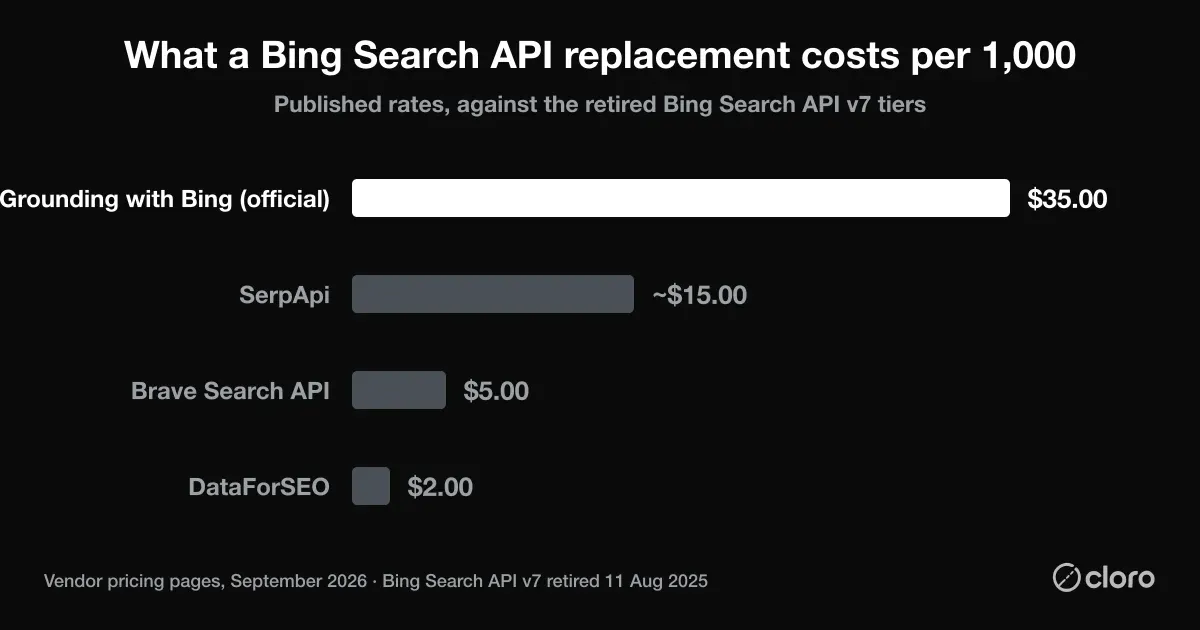
At DataForSEO’s $2/1,000, the same workload that cost $6–25/1,000 on Bing v7 (and would cost $35/1,000 on Grounding) runs roughly 3–17× cheaper, with a SERP-shaped response that matches what v7 returned.
On documentation: the old learn.microsoft.com Bing Search v7 reference is being retired with the API; Microsoft’s retirement announcement now points to the Grounding with Bing Search docs instead. If you’re maintaining legacy code, the field-mapping notes later in this guide are more useful than the archived v7 reference, since the endpoints themselves return HTTP 410 Gone.
Bing Image Search API: what replaced it
The Bing Image Search API didn’t get a separate reprieve. It was retired in the same August 11, 2025 wave as Bing Web Search. Microsoft’s retirement announcement decommissioned the whole family at once: Web, Image, Video, News, Entity, Autosuggest, Spell Check, Visual Search, and Custom Search. If your app called /v7.0/images/search, it returns HTTP 410 Gone today.
Two practical replacements:
- SerpApi Bing Images API. The closest like-for-like. SerpApi kept a dedicated Bing Images endpoint that returns parsed image results (thumbnails, source URLs, dimensions) under the same auth as its other engines, and it’s the only one of these with a dedicated Bing reverse-image endpoint for visual-search workflows. The $75/month (5,000 searches) plan covers it.
- Pivot to Google Images. If the image results themselves mattered more than the fact they came from Bing, a Google Images SERP endpoint (SerpApi or DataForSEO) taps a larger index. cloro covers Google Search and the AI answer surfaces rather than a standalone image-search endpoint, so for image-specific SERP data SerpApi or DataForSEO are the fit.
Which to pick depends on whether “Bing” was load-bearing. For reverse-image or visual search, pick SerpApi.
Bing News Search API: what replaced it
Same story as images: the Bing News Search API was decommissioned in the August 11, 2025 retirement, not spun out as a survivor. Calls to /v7.0/news/search now return 410.
The replacements, ranked by fit:
- SerpApi Bing News API. A dedicated Bing News endpoint returning parsed articles (headline, source, timestamp, snippet). Closest to what v7’s news vertical returned.
- DataForSEO. Bing SERP endpoints surface news blocks inline, and it’s the cheapest at scale ($2/1,000).
- Google News as a substitute index. If you wanted news coverage rather than Bing’s news ranking specifically, a Google News feed is the broader index. See our Google News API guide for what exists there and what to use instead.
For most teams the news vertical was about monitoring coverage, not about Bing’s specific ranking, which makes a Google-News-backed feed the more complete replacement than a like-for-like Bing News scrape.
What if you have legacy v7 code still running?
Pre-retirement Bing Search v7 calls now return HTTP 410 Gone. Production systems still hitting the old endpoints have been making failed calls since August 11, 2025. Three patterns we’ve seen:
- Silent failure with logged errors. Most common. The integration logs the 410 but the surrounding workflow had no alerting on it; data quality degrades over weeks until someone notices a downstream report is empty.
- Hard failure with bubbled exceptions. Less common but easier to diagnose. The integration crashes and someone fixes it immediately.
- Cached results. Workflows that cached results aggressively may still appear to work for cached queries; new queries fail silently.
If you find your code in pattern 1, the cleanest migration is to a third-party SERP API that actually scrapes Bing. SerpApi’s Bing endpoint is the most v7-compatible in field naming; DataForSEO’s Bing endpoint is the cheapest at scale.
Legacy code samples (for reference only, since these endpoints no longer respond)
The canonical Bing Search v7 pattern. It no longer works, but it shows what your existing integration was doing.
# Legacy Bing Search v7 — DO NOT USE in production after August 11, 2025
# Returns HTTP 410 Gone since retirement
import requests

API_KEY = "YOUR_KEY_FROM_BEFORE_RETIREMENT"
ENDPOINT = "https://api.bing.microsoft.com/v7.0/search"

headers = {"Ocp-Apim-Subscription-Key": API_KEY}
params = {"q": "best running shoes", "mkt": "en-US"}

response = requests.get(ENDPOINT, headers=headers, params=params)
# Will return 410 Gone since 2025-08-11
The migration target for that exact pattern, using SerpApi’s Bing endpoint (the closest field-naming match to v7):
# SerpApi Bing endpoint
import requests

SERPAPI_KEY = "YOUR_SERPAPI_KEY"
ENDPOINT = "https://serpapi.com/search.json"

params = {
    "engine": "bing",
    "q": "best running shoes",
    "cc": "US",
    "api_key": SERPAPI_KEY,
}

response = requests.get(ENDPOINT, params=params)
data = response.json()
# data["organic_results"], data["ads"], data["news_results"], etc.
The structural differences from v7:
engine=bingquery param. Specifies the search engine; the same auth and base URL handle Google, Bing, YouTube, and others.api_keyin query string vs subscription key header. SerpApi uses a query-string key by default; can be moved to an Authorization header.- Parsed result envelope.
organic_results,ads,news_resultsarrays at the top level rather than v7’s nestedwebPages.value. ccparameter vsmkt. ISO country code rather than the locale-market combination v7 used.
Bing’s market share is bigger than it looks, and a third of its users don’t know they’re using it
Even with the API retired, Bing remains a meaningful search surface, and the share is hidden in surprising places. Per Backlinko’s 2026 Bing usage stats and Searchlab’s 2026 search engine market share data:
- Bing holds 4.31% global market share across all devices and is the second-most-popular search engine globally with steady ~0.36% YoY growth
- Desktop share is 10.5%, roughly 17× the mobile share of 0.62%, thanks to Windows and Edge default-search integration
- 34% of Bing users don’t know they’re using Bing. They search via the Windows taskbar, Edge address bar, or Cortana, never visiting bing.com directly
- Microsoft Copilot uses Bing’s index for grounding and is integrated by default in Windows 11 and Edge. Every Copilot search query is technically a Bing search, and Copilot’s reach via OS defaults is growing faster than direct Bing.com visits
The 34% “don’t know they’re using Bing” number is the most consequential one for migration planning. It means brand-monitoring or SEO-tracking workflows that drop Bing entirely are missing a chunk of search traffic that users themselves don’t classify as a separate channel. From the user’s perspective they’re just “searching from Windows.” From the data-stack perspective, it’s Bing.
Can you just use Google data as a proxy?
Market share tells you Bing is worth something; it does not tell you whether you need to collect it separately. That is the question a migration actually turns on, so we measured it. In a small pilot for our guide to tracking rankings beyond Google we took five commercial queries, captured Google’s and Bing’s top 10 organic results on the same day under held-constant conditions, reduced each result to its registrable domain, and counted the overlap.
Google and Bing shared a mean of 4 of 10 domains, a 40% overlap. The other 60% of each first page was unique to that engine, and the spread ran from 60% overlap on backlink checker down to 20% on serp api.
Five queries is a pilot, not a study, so treat 40% as directional rather than a constant. The direction is still the useful part: a Google-only dataset reconstructs well under half of Bing’s first page, so substituting one for the other is not a rounding error. If Bing genuinely matters to your reporting, it has to be collected. If it does not, the honest move after the v7 retirement is to drop it rather than to approximate it.
For teams doing brand monitoring, competitive intelligence, or SEO tracking, dropping Bing from the data stack means dropping a ~4-10% slice of the global search surface (higher on desktop, dominant inside Windows ecosystems) plus an outsized share of Copilot-mediated AI traffic. The third-party SERP APIs above are the practical migration path; Grounding with Bing Search in Azure AI Agents is the official path that most teams find structurally wrong.
Decision tree: pick the right replacement
Use this:
- Need Bing SERP JSON with a similar shape to legacy v7? SerpApi (field-naming closest), DataForSEO (lowest base rate at scale), or SERPHouse (free tier, then $0.62–$0.75/1k). All three scrape Bing.com directly.
- Did you just need general web-search results, and Bing was only the API you could get? cloro: live Google SERP (organic, ads, AI Overview, People Also Ask) in one JSON call, against a bigger index than Bing’s. Not Bing’s own results, but for general web search that’s usually an upgrade.
- Was Bing your “non-Google index” choice and you don’t actually need Bing-the-engine? Brave Search API: independent index, similar use case.
- Building an AI agent or RAG pipeline rather than doing classic rank tracking? Firecrawl. Curated authoritative-source search is often the better functional fit.
- Was your v7 use case feeding an AI workflow (brand-visibility tracking, RAG, agent search)? Most of that traffic has migrated from Bing-the-web-search-engine to the AI surfaces themselves. cloro covers ChatGPT, Perplexity, Gemini, Microsoft Copilot (Bing-grounded), Google AI Overview, and AI Mode. Not Bing directly, but the AI surfaces that absorbed the feeder use cases.
- Have to stay on Microsoft’s official path for compliance/contractual reasons? Grounding with Bing Search in Azure AI Agents. Accept the 40-483% cost increase and the Azure Agents framework overhead.
The bottom line
The Bing Search API v7 is gone. Microsoft’s replacement is structurally an AI-agent product, not a search API, and runs significantly more expensive. For the SEO, monitoring, and intelligence-gathering use cases that genuinely need Bing’s own results, the practical 2026 answer is SerpApi or DataForSEO. But if Bing was only incidental, meaning you needed general web search and Bing was just the API you could get, cloro’s live Google SERP is usually the better swap, against a bigger index. And for the AI-workflow-feeder use cases v7 served (RAG pipelines, agent data ingestion, brand-visibility tracking), the right answer is usually the AI-search-surface APIs themselves: cloro for ChatGPT, Perplexity, Gemini, Copilot, AI Overview, and AI Mode coverage; Firecrawl for curated full-content search.
If your Bing v7 workload was general web search or the AI-feeder pattern, start with cloro. 500 free monthly credits is enough to test how Google SERP and the AI surfaces handle your priority queries before committing. If you need Bing’s own results specifically, SerpApi or DataForSEO are the direct replacements.
For the deeper SERP-API category comparison see Best SERP APIs in 2026. For pricing specifically see Cheapest SERP API 2026. For Google-specific scraping see Best Google Scraper 2026.

About the author
Ricardo Batista
Founder, cloro
Ricardo is one of the founders and engineers behind its SERP and AI-search scraping infrastructure. Before cloro he scaled a financial comparison site to $7M ARR and ran the full-country operations of a unicorn to $65M ARR, then went back to building. He writes about search engine scraping, generative-engine optimization, and turning live search and AI-answer data into something teams can act on.
Frequently asked questions
Is the Bing Search API still available in 2026?
No. Microsoft retired the Bing Search API v7 on August 11, 2025. Creation of new Bing Search resources in Azure was disabled in February 2025, the formal retirement notice landed on May 13, 2025, and the public endpoints stopped responding entirely on August 11, 2025, returning an HTTP 410 Gone error. As of 2026, the official replacement is 'Grounding with Bing Search' inside the Azure AI Agents Service, but most teams migrate to third-party SERP APIs instead.
What does Microsoft recommend as a replacement?
Microsoft's official replacement is 'Grounding with Bing Search', a feature inside the Azure AI Agents Service. It returns Bing-grounded results to AI agents rather than direct SERP JSON, requires the full Azure Agents framework (resource provisioning, role assignments, agent configuration), and runs significantly more expensive than the legacy v7 API: published comparisons show 40-483% cost increases depending on workload. The underlying Azure OpenAI Assistants API is itself now deprecated, with a hard retirement date of August 26, 2026 and a migration path to Microsoft's Foundry Agents service. The official replacement therefore runs on a platform that is itself being replaced on the same timeline.
What are the best third-party Bing Search API alternatives in 2026?
Five real alternatives, ranked by typical fit. SerpAPI for full Bing SERP parsing with the broadest engine catalog. DataForSEO for the lowest SERP rate at scale ($2/1k). SERPHouse for a Bing-native parser with a free 4,000-credit tier, then $0.75/1k on its $29.99 plan. Brave Search API for an independent 30B-page index outside the Google/Microsoft duopoly. Firecrawl for AI-application use cases where curated authoritative-source search beats a raw SERP. If your Bing use case was 'multi-engine non-Google search to feed AI workflows,' cloro is a separate option. It doesn't scrape Bing directly, but it covers the AI surfaces (ChatGPT, Perplexity, Gemini, Copilot, AI Overview, AI Mode) where most of that search traffic has migrated. None of these require Azure resource provisioning.
I have a legacy Bing Search API key: does it still work?
No. Keys issued before retirement stopped returning data on August 11, 2025. The endpoints return HTTP 410 Gone. Pre-retirement code that's still running in production is making failed calls. The migration is mandatory; the only question is which replacement you pick.
How can I get an API key to replace my Bing Search API key?
Get it from the replacement you pick. Each third-party SERP API (SerpApi, DataForSEO, SERPHouse, Brave) issues its own key when you create an account, with no Azure resource to provision. Microsoft's Grounding with Bing Search needs an Azure subscription and a Grounding with Bing resource, and its keys sit on that resource in the Azure portal. New Bing Search v7 keys cannot be created.
Can I scrape Bing.com directly instead of using an API?
Technically yes, but you'll need to handle the same bot-detection stack that protects the consumer site. Microsoft enforces rate limits aggressively on suspicious patterns and uses Cloudflare-grade TLS fingerprinting and behavioral profiling. Building and maintaining a Bing scraper means rotating residential proxies (typically $3-15 per GB), handling JavaScript rendering for dynamic elements, and updating selectors when the page changes. Most teams find that a third-party SERP API is cheaper than DIY scraping within the first month at meaningful volume.
Does cloro scrape Bing directly?
No. cloro covers Google Search, Google AI Overview, Google AI Mode, ChatGPT, Perplexity, Gemini, Copilot, and Grok, but not Bing.com directly. If you wanted general web search rather than Bing's index specifically, cloro's live Google SERP is a direct alternative (a bigger index); for raw Bing SERP data you want SerpApi or DataForSEO. Where cloro also overlaps with a Bing use case is Microsoft Copilot: cloro's Copilot endpoint returns the Bing-grounded sources Copilot cites in its responses. For classic Bing organic/ads/news scraping, use a Bing-native alternative.
How much did the official replacement cost compared to the legacy v7 API?
Per published comparisons of Microsoft's Grounding with Bing Search vs the retired v7 API, the new path costs 40-483% more depending on workload shape, with smaller-volume users seeing the larger percentage increase. The legacy v7 F1 tier offered 1,000 free transactions/month plus tiered per-1,000 pricing starting around $3 per 1k. The Grounding with Bing path adds Azure agent compute, role-based access management, and resource-provider overhead on top of the per-search rate.
Should I wait for Microsoft to ship a different replacement?
Probably not. Microsoft's public stance has been that Grounding with Bing Search in Azure AI Agents is the replacement; there's no public roadmap for a direct v7-style successor. Teams that depend on Bing data have generally moved to third-party SERP APIs that scrape Bing.com directly and return SERP-shaped JSON, which avoids both the Azure agent overhead and the platform-risk from the Assistants API's own deprecation timeline.
How much did the Bing Search API cost, and what do alternatives cost now?
Bing Search API v7 had a free F1 tier (1,000 transactions/month); paid tiers ran $25/1,000 (S1), $15/1,000 (S2), and $6/1,000 (S3) after Microsoft's 2023 price increase. The official replacement, Grounding with Bing Search, costs $35/1,000, a 40% to 483% jump depending on which old tier you were on. Third-party SERP APIs undercut both: DataForSEO at $2/1,000 and SerpApi at roughly $15/1,000 on its $75/month plan.
Is there a Bing Image Search API alternative?
Yes, and you need one, because the Bing Image Search API was retired in the same August 11, 2025 shutdown as the web endpoint. SerpApi offers a dedicated Bing Images endpoint that's the closest like-for-like replacement. If the images mattered more than the Bing source, a Google Images SERP endpoint (SerpApi or DataForSEO) taps a larger index. cloro covers Google Search and the AI answer surfaces, not a standalone Bing image endpoint.
What replaced the Bing News Search API?
The Bing News Search API was decommissioned on August 11, 2025 alongside the rest of the Bing Search family, so calls to the old news endpoint now return HTTP 410 Gone. SerpApi's Bing News endpoint is the closest direct replacement; DataForSEO returns news blocks in its Bing SERP results at the lowest rate at scale. If you wanted news coverage rather than Bing's specific ranking, a Google News feed is the broader index. See our Google News API guide.
Where is the Bing Search API documentation now?
The Bing Search v7 reference docs on learn.microsoft.com are being retired with the API itself. Microsoft now directs developers to the Grounding with Bing Search documentation inside the Azure AI Agents service. For teams maintaining legacy v7 integrations, the field-mapping notes in a migration guide are more practical than the archived reference, since the v7 endpoints themselves return HTTP 410 Gone.
Related reading
Best SERP APIs 2026: 9 Tested on Cost, AI and Tracking
9 SERP APIs tested head to head on AI Overview parsing, engine breadth, rank-tracking depth, and true cost per 1,000 calls. Full benchmark table inside.
Cheapest SERP API 2026: True Cost-per-Call Compared
The cheapest SERP API in 2026, ranked by true cost-per-call. Compare cloro, DataForSEO, Serper, and SerpApi, plus the hidden fees that flip rankings.

Best Google Scraper 2026: 10 Tested Across 5 Verticals
Benchmark of 10 Google scrapers across SERP, Maps, Jobs, Images, Business Profile. Real cost per call, AI Overview depth, vs SerpApi + Bright Data.