
Google Rank Tracking API: Python + Node Walkthrough

On this page
A Google rank tracking API lets you monitor keyword positions programmatically instead of relying on a fixed dashboard.
The API returns structured SERP data; your workflow decides what to store, how often to check, which locations to simulate, and how to alert on changes. That is useful when off-the-shelf rank tracking software cannot match your reporting, scale, or data ownership needs.
This guide explains the workflow: query setup, geo parameters, scheduling, storage, and reporting. If you want the buyer-side comparison first, see rank tracking software for classic tools, AI rank tracking for the AI-answer tier, and SERP API pricing.
Why build a custom rank tracking workflow
Off-the-shelf rank tracking tools are convenient. They also lock you into their feature set, their data structure, and their pricing. For any team that needs deep customization, total data ownership, or integration with internal systems, these tools hit a wall fast.
That’s the point where building your own workflow with a Google rank tracking API starts to pay for the effort.
The core difference between using a standard rank tracker and building your own process comes down to control, cost, and ownership.
Off-the-shelf tool vs. custom API workflow
| Feature | Off-the-Shelf Rank Tracker | Custom API Workflow |
|---|---|---|
| Flexibility | Limited to pre-defined features | Infinitely customizable |
| Data Ownership | You’re renting access to your data | You own the raw data forever |
| Integration | Limited (Zapier, basic APIs) | Direct integration into any system |
| Tracking Frequency | Usually fixed (e.g., daily) | You decide (hourly, daily, on-demand) |
| Granularity | Often broad (e.g., country-level) | Hyper-local (postal code, city) |
| Cost at Scale | Can become very expensive | More cost-effective for large volumes |
A pre-built tool offers simplicity; a custom API workflow gives you control and a data asset that keeps accumulating. Build it yourself and you own the raw data outright, so you decide what to track, how often to check it, and how it is stored and used.

Granularity and control
A standard SaaS tool might give you daily rank updates. But what if you need hourly moves for a product launch, or rankings across ten different neighborhoods for a local SEO campaign? That is the gap a custom workflow fills.
You can get precise with your tracking parameters:
- Hyper-local geographies like specific cities, neighborhoods, or postal codes.
- Device types, to see the split between mobile and desktop rankings.
- Country and language parameters. Google began redirecting local domains like
google.detogoogle.comin April 2025, so target a market by parameter, not by domain. - SERP features, to see if you’re showing up in AI Overviews, featured snippets, or map packs.
This level of detail gives you a richer picture of your actual search visibility, and uncovers opportunities and threats that broad, national-level tracking misses.
Owning your historical data is probably the single biggest win. It becomes a permanent, proprietary asset. You can analyze long-term trends, tie ranking shifts to specific SEO efforts, and understand the impact of Google algorithm updates without being tethered to a SaaS subscription.
The business case for a custom API solution
Beyond technical flexibility, building your own system makes good business sense. You can pipe ranking data directly into your BI tools, CRMs, or internal dashboards. Picture a single view where a drop in rankings for a money keyword sits next to the corresponding dip in sales revenue.
That integration moves rank tracking from an isolated SEO metric to a business-critical KPI.
Plus, when you’re tracking thousands or tens of thousands of keywords, a high-performance scraping API like cloro tends to be far more cost-effective than the per-keyword fees most SaaS platforms charge. The payoff is faster, more precise rank monitoring that sits inside the systems you already use.
How often do Google rankings actually change? (30-day data study)
The reason daily rank tracking exists — rather than weekly or monthly — is that Google’s top results are far less stable than most dashboards imply. We measured it directly.
Using cloro’s own monitoring corpus, we tracked a cohort of 200 keywords sampled daily for 30 days and counted how often the #1 organic result changed from one day to the next:
- The #1 result changed on 31.7% of consecutive days — 1,826 changes across 5,755 day-pairs. Roughly one day in three, the top result for a tracked keyword is not the one that was there yesterday.
- Volatility is wildly uneven. The most turbulent keyword cycled through 16 different #1 domains in a month and changed on 93% of days; the calmest barely moved. A single “average volatility” number hides that spread — which is exactly why you store per-keyword history instead of a single trend line.
Cohort is customer-monitored queries (conversational, branded, multilingual), bounded to keep the extraction tractable — read the figure as directional daily #1-position churn, not a universal constant.
The practical implication for your cadence: if a third of your money keywords can change their top result overnight, weekly checks miss most of the movement and monthly checks are noise. Daily is the floor for anything commercial. This is also why owning the raw daily history matters — the volatility is the signal (a competitor displacing you on 40% of days is a story a weekly snapshot never tells). For the algorithm-update backdrop that made rankings this jumpy, see what the N100 Google update changed; for the day-to-day tracking mechanics, track ranks on the SERP.
What daily rank tracking actually costs
The other reason teams build this workflow is cheap rank tracking at scale — most SaaS rank trackers bill per keyword per day, which turns punishing the moment you track thousands of terms.
Here’s the teardown for the canonical workload: 1,000 keywords tracked once daily = ~30,000 SERP fetches per month.
| Approach | Billing model | ~Cost for 1,000 keywords/day |
|---|---|---|
| Custom workflow on a pay-per-call SERP API (cloro) | Per SERP fetched | ~$25–40/month in API credits |
| Off-the-shelf SaaS rank tracker | Per keyword, per day | Typically $100–300+/month at this volume |
The pay-per-call math scales linearly and predictably: we run a similar daily tracker over ~200 keywords for under $5/month in credits (see the working example below), so 1,000 keywords lands in the low tens of dollars. SaaS pricing, by contrast, is priced on keyword count and jumps in tiers — you pay for the seat, the dashboard, and the retention window whether or not you use them, and per-keyword rates rarely drop below what raw SERP fetches cost. The custom workflow wins on cost specifically at scale; below a few hundred keywords, a SaaS tool’s convenience is often worth the premium. For the buyer-side view, the rank tracking use case page maps which tier fits which team.
Selecting the right SERP API and endpoints
The API you choose is the backbone of your Google rank tracking API workflow. Pick the wrong one and you’re in for inaccurate data, surprise bills, and constant downtime. Get it right and you have a steady stream of reliable, structured data that fuels good decisions.
Look past the sales pitch to the criteria that decide your project’s outcome.
Key API selection criteria
An API that looks cheap but has spotty uptime or bad data will cost you more than it saves.
- Data accuracy and freshness. Is the API scraping live results, or serving cached responses? For daily rank tracking, you need live data.
- Uptime and reliability. Look for providers that guarantee 99.9% uptime or higher. An unreliable API breaks your automated workflows and leaves data gaps.
- Cost structure. Compare pricing models. Flat monthly fee, pay-per-call, or credit system? A transparent pay-per-call model like cloro’s can save you money as you scale.
- Documentation quality. Clear docs with copy-paste code examples speed up implementation. Poor documentation is a red flag.
- SERP feature support. Modern SERPs are more than ten blue links. In 2026, your API has to parse data from Google’s AI Overviews, shopping carousels, and People Also Ask boxes. Without that, your tracking misses most of what the page now shows.
Real-time vs. historical endpoints
Once you have a shortlist, you need to understand their endpoints. Not all API calls are created equal, and most SERP APIs offer two main flavors.
The workhorse for daily rank tracking is the real-time search endpoint. You send a request with your keyword, location, and device, and the API scrapes the current, live SERP for those parameters. This is how you find out where you rank right now.
Then there’s the historical SERP endpoint. Instead of pulling a live result, this endpoint lets you tap an archive of past SERPs. Useful for analyzing rank fluctuations over time or seeing how a Google update reshaped the results.
A google rank tracking API earns its keep because Google never serves one universal ranking. Google personalizes results using each searcher’s location, settings, and context, so the same query returns different positions in different places — which is exactly why an API lets you pin the location and device for every check. For SEO agencies, some rank tracking APIs are built specifically for bulk tracking into custom BI dashboards, a need that grew sharper once Google’s AI Overviews began sitting above the classic organic results and pushing them further down the page.
Choosing the right API provider
There are dozens of providers, but the choice usually comes down to your technical needs and scale. For teams building advanced automation against modern SERP features, you need an API built for that reality. The cloro scraping API, for example, is purpose-built for extracting structured JSON from elements like Google AI Overviews and shopping results.
A critical factor is how well the API handles the chaos of modern search. An API that only returns a list of organic rankings gives you an incomplete picture. You need visibility into every SERP feature where your brand or your competitors might appear.
The best API is the one that fits your goals. Are you a small shop tracking a few dozen keywords, or an enterprise monitoring thousands across multiple countries? A thorough comparison helps. We put together a deep-dive on how to choose from the best SERP APIs for your project. This one decision shapes the power and limits of your rank tracking workflow.
With your API picked, the next step is pulling some data. The goal is to go from zero to a structured SERP in a few minutes, using a competitive keyword: “project management software” for a desktop user in the United States.
The essential API parameters
An API call is a structured question you send to a server. To get the right answer, you have to ask the right way. The instructions are called parameters, and for rank tracking, a few are non-negotiable.
query. Your keyword. For our test,query=project management software.countryorlocation. The geographic market you’re targeting. For a US search, usecountry=us. Don’t skip this; rankings swing wildly between countries.device. Mobile or desktop.device=desktopshows you what a user on a computer sees, which is often a different SERP from mobile.- API Key. Your private credential. It authenticates the request and tells the provider who to bill. Never expose your API key in client-side code.
With those four pieces, you’re ready to build the request.
Code examples
Send an authenticated request with your query, country and device, and cloro returns parsed JSON, with no HTML to clean up. Here are a couple of examples covering cURL and Python. (If you’re still finding your feet with the language, our web scraping with Python primer covers the fundamentals these snippets build on.)
cURL example
For a quick test from your terminal, cURL is the standard tool. This one-liner fetches the SERP for our keyword.
curl -X POST "https://api.cloro.dev/v1/monitor/google" \
  -H "Authorization: Bearer YOUR_API_KEY" \
  -H "Content-Type: application/json" \
  -d '{"query": "project management software", "country": "US", "device": "desktop"}'
The API returns a JSON object containing the full search results page data.
Python with the requests library
For more serious automation, Python is the obvious choice. With the requests library, the same API call drops cleanly into a larger application. For the full production-grade client — retry/backoff, async fan-out with httpx, and the same request shape across every engine — see our SERP API for Python guide.
import requests
import json

api_key = 'YOUR_API_KEY'
headers = {
    'Authorization': f'Bearer {api_key}'
}
payload = {
    'query': 'project management software',
    'country': 'US',
    'device': 'desktop'
}

response = requests.post('https://api.cloro.dev/v1/monitor/google', headers=headers, json=payload)

if response.status_code == 200:
    serp_data = response.json()
    # Now you're ready to parse the serp_data
    print(json.dumps(serp_data, indent=2))
else:
    print(f"Request failed with status code: {response.status_code}")
Node.js with fetch
The same call from a Node 18+ ESM runtime using the built-in fetch. Wrap the top-level call in an exported handler when porting to AWS Lambda, a Cloudflare Worker, or a Next.js API route — those targets each export their own entry shape.
const API_KEY = process.env.CLORO_API_KEY;

async function fetchRank(query) {
  const res = await fetch("https://api.cloro.dev/v1/monitor/google", {
    method: "POST",
    headers: {
      Authorization: `Bearer ${API_KEY}`,
      "Content-Type": "application/json",
    },
    body: JSON.stringify({ query, country: "US", device: "desktop" }),
  });

  if (!res.ok) {
    throw new Error(`cloro returned ${res.status}: ${await res.text()}`);
  }
  return res.json();
}

const serpData = await fetchRank("project management software");
console.log(JSON.stringify(serpData, null, 2));
Parsing the JSON response
The value is in the JSON response, so pick it apart for what you need.
The data points to pull from the organic results are
position,link, andtitle. Finding your domain in that list is the core of rank tracking.
cloro’s response carries them in result.organicResults. Loop through it to find your domain.
Here’s a Python snippet showing how to parse organicResults and find where you rank.
my_domain = "example.com"

# 'serp_data' is the parsed JSON from the previous step
organic_results = serp_data['result'].get('organicResults', [])

for result in organic_results:
    if my_domain in result.get('link', ''):
        print(f"Domain Found! Rank: {result.get('position')}, URL: {result.get('link')}")
        break
else:
    print("Domain not found in the top results.")
The loop iterates through each result, checks the URL for your domain, and prints the rank. That’s the first piece of actionable intelligence from your rank tracking workflow.
Automating and scaling your rank tracking system
A single rank tracking API call is a good start; the value comes from automation. Moving from one-off checks to a fully engineered system turns rank tracking from a periodic chore into a constant stream of business intelligence.
The building block for any automated system is a single, successful API call.
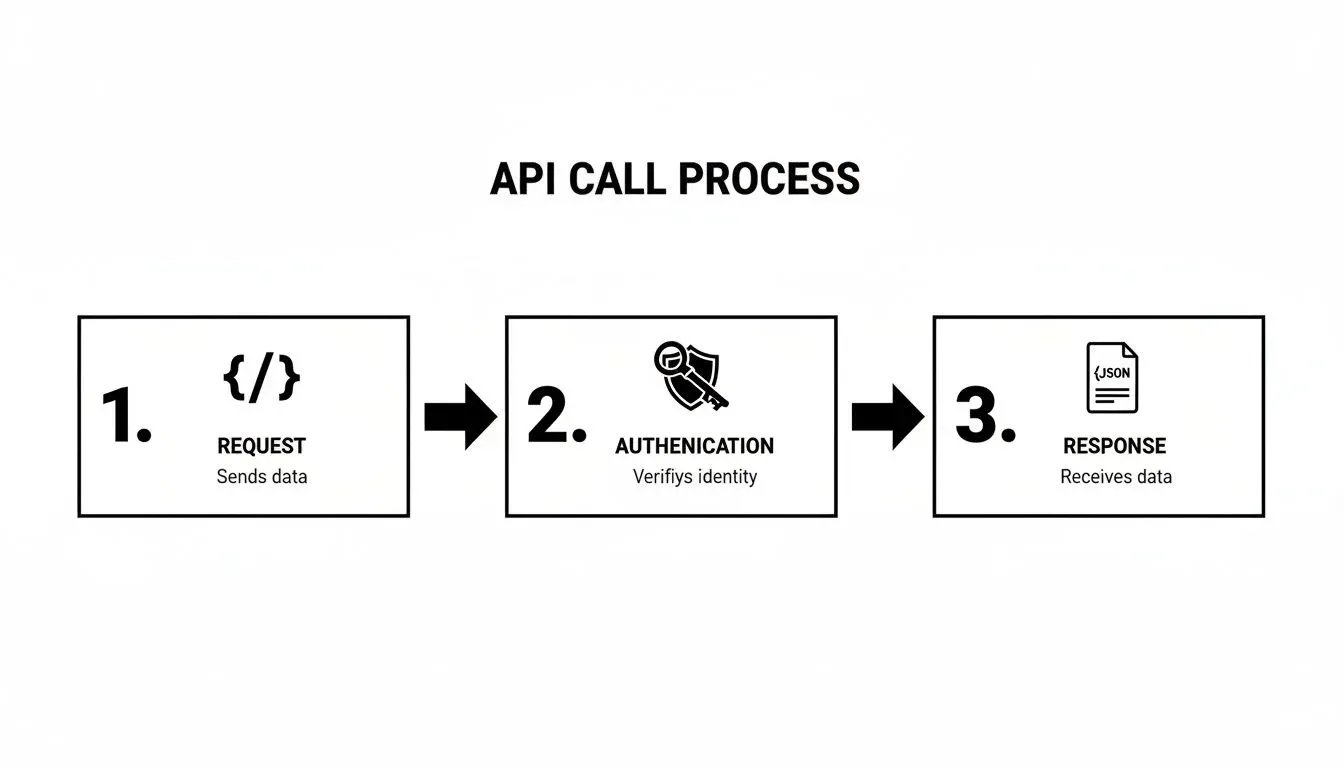
That loop (request, authenticate, response) is what your system runs thousands of times. The trick is managing those calls efficiently as you scale.
Running it nightly
A GitHub Actions workflow scheduled with POSIX cron syntax is the lowest-friction nightly scheduler — no server, free for public repos, fits in 25 lines.
# .github/workflows/rank-tracker.yml
name: nightly rank tracker
on:
  schedule:
    - cron: "0 6 * * *"   # 06:00 UTC daily
  workflow_dispatch:       # manual trigger for backfills

jobs:
  track:
    runs-on: ubuntu-latest
    steps:
      - uses: actions/checkout@v4
      - uses: actions/setup-python@v5
        with:
          python-version: "3.12"
      - run: pip install httpx psycopg2-binary
      - run: python scripts/track_ranks.py
        env:
          CLORO_API_KEY: ${{ secrets.CLORO_API_KEY }}
          DATABASE_URL: ${{ secrets.DATABASE_URL }}
Self-hosted alternative: a single-line cron entry (0 6 * * * /usr/bin/python /opt/rank-tracker/track_ranks.py) does the same thing. The Action shape wins on observability — failed runs show up in your repo’s Actions tab without log-spelunking.
For serverless platforms (AWS Lambda + EventBridge, Cloud Run + Cloud Scheduler), the trigger and runtime change but the script in the middle is identical to the Python above.
Storing your ranking data
For anything past a few hundred keywords, the right storage for your rank tracking API data is a relational database with one row per (keyword, domain, captured_at). Postgres is the sane default.
Schema
CREATE TABLE rank_history (
  id           BIGSERIAL PRIMARY KEY,
  keyword      TEXT        NOT NULL,
  domain       TEXT        NOT NULL,
  country      TEXT        NOT NULL DEFAULT 'us',
  device       TEXT        NOT NULL DEFAULT 'desktop',
  position     INT,                    -- NULL when domain didn't rank in top 100
  serp_url     TEXT,                   -- the actual URL that ranked
  ai_overview_cited BOOLEAN NOT NULL DEFAULT FALSE,
  captured_at  TIMESTAMPTZ NOT NULL DEFAULT now()
);

CREATE INDEX rank_history_kw_domain_idx
  ON rank_history (keyword, domain, captured_at DESC);
position is nullable so “didn’t rank in top 100” is a first-class state, not a sentinel like -1. ai_overview_cited tracks whether your domain appeared in the AI Overview source list — separate from organic rank because they’re separate citation surfaces.
Insert after each API call (Python)
import psycopg2

def store_rank(conn, keyword, domain, serp_data):
    result = serp_data["result"]
    organic = result.get("organicResults", [])
    position = next(
        (r["position"] for r in organic if domain in r.get("link", "")),
        None,
    )
    serp_url = next(
        (r["link"] for r in organic if domain in r.get("link", "")),
        None,
    )
    ai_sources = (result.get("aioverview") or {}).get("sources", [])
    ai_cited = any(domain in s.get("url", "") for s in ai_sources)

    with conn.cursor() as cur:
        cur.execute(
            """
            INSERT INTO rank_history
              (keyword, domain, position, serp_url, ai_overview_cited)
            VALUES (%s, %s, %s, %s, %s)
            """,
            (keyword, domain, position, serp_url, ai_cited),
        )
    conn.commit()
The query “what’s our position trend for [keyword] over 90 days” becomes a one-liner:
SELECT captured_at::date, position
FROM rank_history
WHERE keyword = 'project management software'
  AND domain  = 'example.com'
  AND captured_at > now() - interval '90 days'
ORDER BY captured_at;
For CSV exports or quick one-offs, \copy rank_history TO 'ranks.csv' CSV HEADER from psql works. MongoDB or a NoSQL store buys you nothing here — rank tracking is a textbook relational workload.
Handling rate limits and retries
A nightly job that fires thousands of requests at once will outrun your plan’s concurrency ceiling; handle that gracefully and you get a complete run, ignore it and you get silent gaps in your rank history instead of a loud failure.
cloro’s Hobby plan supports 10 concurrent requests; Growth and Business raise that to 50 and 100. The HTTP contract:
429 Too Many Requests— you exceeded your concurrency ceiling. Back off and retry.5xx— transient error on cloro’s side. Retry with exponential backoff, the standard strategy Google Cloud recommends for429and5xxresponses.4xxother than 429 — your request is wrong. Don’t retry; surface to the caller.
A drop-in async retry wrapper in Python using httpx:
import asyncio
import os
import httpx

API = "https://api.cloro.dev/v1/monitor/google"
API_KEY = os.environ["CLORO_API_KEY"]

async def fetch_with_retry(client, keyword, max_retries=5):
    backoff = 1.0
    for attempt in range(max_retries):
        r = await client.post(
            API,
            json={"query": keyword, "country": "US", "device": "desktop"},
            headers={"Authorization": f"Bearer {API_KEY}"},
            timeout=30,
        )
        if r.status_code == 200:
            return r.json()
        if r.status_code == 429 or r.status_code >= 500:
            await asyncio.sleep(backoff)
            backoff = min(backoff * 2, 30)
            continue
        r.raise_for_status()
    raise RuntimeError(f"giving up on {keyword!r} after {max_retries} retries")


async def run_batch(keywords, concurrency=10):
    sem = asyncio.Semaphore(concurrency)
    async with httpx.AsyncClient() as client:
        async def one(k):
            async with sem:
                return k, await fetch_with_retry(client, k)
        return await asyncio.gather(*(one(k) for k in keywords))
The Semaphore enforces your plan’s concurrency ceiling locally — you never even fire requests above the limit, so 429s become rare. Exponential backoff with a 30-second ceiling handles the residual case.
For multi-thousand-keyword runs that span hours, a message queue (RabbitMQ, AWS SQS, or even Postgres SELECT FOR UPDATE SKIP LOCKED) lets workers pick up where they left off across restarts. Adopt the queue when your batch runtime exceeds your retry/scheduler tolerance — for sub-1,000-keyword nightly jobs, the async semaphore above is enough.
Analyzing and visualizing your ranking data
The API calls are done and data is flowing into your database. Now what?
Collecting rank data is the easy part. The work, and the value, comes from turning that stream of numbers into something that helps you make smarter decisions. With data from your Google rank tracking API, you can move past knowing your position and start understanding your performance.

The point is to spot trends before they become problems, and to find the opportunities competitors miss.
Turning raw data into strategic insights
Historical ranking data is worth far more than today’s number on its own. Analyze movement, volatility, and patterns over time to get the full picture.
A few useful ways to slice the data:
- Rank velocity. How fast a keyword’s rank is changing. High positive velocity can mean a content refresh is working. High negative velocity means a page is bleeding visibility and you need to know why.
- Rank volatility. Some keywords bounce around. By tracking volatility, you learn to distinguish normal flux from real issues that need attention.
- Keyword cannibalization. A common own-goal where two or more of your pages compete for the same keyword. If you see different URLs swapping in and out of the top spots, consolidate your strategy.
This is also how you justify your SEO budget with hard numbers. Position translates into traffic: the #1 organic result earns an average 27.6% click-through rate, and the top three results together capture 54.4% of all clicks, so a page climbing from the bottom of page one into the top three multiplies its traffic. Shifting “project management software” from position #12 to #3 isn’t a vanity metric — on a term with 5,000 monthly searches, that climb adds hundreds of visits a month, and at a 3% conversion rate and a $200 order value it compounds into thousands of dollars in monthly revenue.
APIs from providers like cloro matter here because they capture modern SERP features — shopping carousels, AI Overviews, and answers drawn from engines like Gemini or Perplexity — that increasingly mediate what a searcher actually sees. Pulling that structured data through a rank tracking API in one automated pass also collapses the manual copy-paste reporting that otherwise eats an SEO team’s week. For more, see how to track your Google rankings effectively on outrank.so.
Building visualization dashboards
Analysis is for you; visualization is for everyone else. A well-designed dashboard tells a story that your team or the C-suite can understand in about five seconds.
The goal of a dashboard isn’t to display data; it’s to surface insights. Your visuals should answer the key questions immediately. Are we winning or losing? Where are the biggest opportunities? What’s on fire?
You don’t need a massive BI platform to start. You can build solid dashboards with tools you probably already have.
Common visualization tools
- Google Data Studio (Looker Studio). Free, capable, and it plugs into Google Sheets or any major database. A reasonable default.
- Tableau or Power BI. Enterprise-grade options offering deeper data exploration if you need it.
- Python libraries (Matplotlib, Seaborn). For teams that live in code, these give you full control over custom charts.
Essential charts for your dashboard
Don’t dump every metric onto one screen. Focus on visualizations that highlight change and performance. A few key charts cover most of what you need.
Start with a line chart showing average rank over time for a core set of keywords. That’s your 30,000-foot view of SEO momentum.
Add a table of the biggest weekly winners and losers. It flags which keywords and pages are making big moves, telling you where to focus.
Finally, build a bar chart showing rank distribution: the number of keywords in positions 1-3, 4-10, 11-20, and so on. Watching those buckets shift over time is one of the clearest ways to see whether you’re gaining or losing ground on page one.
Building a rank tracking workflow: key decisions
When you start building a custom rank tracking workflow with an API, the same questions come up. Getting these right from the start saves pain later.
How is a SERP API different from scraping Google directly?
One is a product you buy; the other is a maintenance problem you inherit.
Scraping Google yourself is a fast track to getting blocked. Google’s Terms of Service prohibit using automated means to access its services in ways that bypass its protective measures, and its search spam policies classify automated scraping of results as a violation — on top of the policy risk, their anti-bot systems are genuinely effective. You’ll spend your time fighting IP bans, CAPTCHAs, and ever-changing HTML, which makes your data unreliable.
A commercial SERP API is built to absorb all that pain.
- Reliability. The provider handles the proxy and CAPTCHA infrastructure. You make a call and get clean data. Success rates are high because it’s their core business.
- Scale. These services handle millions of requests. Your system can grow without you becoming a proxy management expert.
- Structured data. Instead of parsing raw HTML, a modern API like cloro delivers structured JSON. The data is already parsed, saving hundreds of development hours.
A SERP API lets you focus on using the data, not acquiring it.
Can I track rankings for different devices and locations?
Yes. If you’re not, you’re missing half the picture. This is one of the bigger wins of using a proper API. Rankings shift between mobile and desktop, or between Berlin and San Francisco.
A good API lets you specify these parameters with every request.
- Mobile vs. desktop. Set a
deviceparameter to see how you perform on each. Given that Google uses the mobile version of a page for indexing and ranking under mobile-first indexing, this isn’t optional. - Target by country. Use a country code (
defor Germany) for accurate international SEO data. - Go hyper-local. Drill down to a specific city, state, or postal code. For a local business, knowing you’re #1 in one zip code but #12 in another is a meaningful insight.
This level of granularity isn’t something most off-the-shelf tools deliver at scale. With an API, it’s a standard feature.
What’s the best way to store historical ranking data?
Storage should match the size of the job.
For a small project tracking under 500 keywords, a Google Sheet or a folder of CSVs works. Simple, no database overhead.
Once you hit thousands of keywords tracked daily, that approach falls apart. You need a real database. PostgreSQL or MySQL is almost always the answer. Both handle the volume and let you run SQL queries to spot trends over time. Set up tables for keywords, domains, and daily rank entries.
Don’t over-engineer it at first, but don’t paint yourself into a corner. Starting with a simple SQL database is the right middle ground. It gives you a foundation that scales for years.
How do I handle SERP changes like AI Overviews?
The SERP is now a collage of AI Overviews, Featured Snippets, and “People Also Ask” boxes.
Your rank tracker is useless if it’s blind to those elements.
This is where your choice of API provider matters. A basic scraper might return the organic list and leave you in the dark about visibility in the features that matter most now.
A modern API provider like cloro maintains its parsers carefully. It sees the entire SERP and pulls structured data from everything, including:
- Google AI Overviews
- Featured Snippets
- “People Also Ask” (PAA) boxes
- Knowledge Panels and Shopping Carousels
Using an API that understands the modern SERP means your tracking reflects reality. You can see if you’re cited in an AI Overview and measure how these new elements push down traditional organic results.
Working code examples
Two minimal examples showing how to call a rank-tracking API and extract the position for a target domain. Both hit the cloro SERP API; swap the endpoint to use any other provider.
Example 1: Python
import os
import requests

API_KEY = os.environ["CLORO_API_KEY"]
TARGET_DOMAIN = "example.com"
KEYWORD = "best running shoes"

resp = requests.post(
    "https://api.cloro.dev/v1/monitor/google",
    headers={"Authorization": f"Bearer {API_KEY}"},
    json={"query": KEYWORD, "country": "US", "hl": "en", "pages": 10},
    timeout=60,
)
resp.raise_for_status()
data = resp.json()["result"]

position = next(
    (r["position"] for r in data["organicResults"]
     if TARGET_DOMAIN in r.get("link", "")),
    None,
)
print(f"{KEYWORD!r} → position {position}")
This returns the first organic position your domain holds, or None if it isn’t in the top 100. In our testing, parsing more than just organicResults matters: the aioverview block and other SERP features routinely push the top organic result below position 4 visually, even though it still reports as position 1.
Example 2: curl + jq
curl -s -X POST "https://api.cloro.dev/v1/monitor/google" \
  -H "Authorization: Bearer $CLORO_API_KEY" -H "Content-Type: application/json" \
  -d '{"query": "best running shoes", "country": "US"}' \
| jq '.result.organicResults[] | select(.link | contains("example.com")) | .position'
Drop this into a daily cron and append the output to a CSV. That’s a working tracker. At top-10 depth, 200 keywords a day is 200 × 30 × 3 = 18,000 credits a month, inside the Lite plan’s 37,500.
Want a reliable Google rank tracking API? cloro returns structured data from Google, Gemini, Perplexity, and more, so you can build the workflow your team actually needs. Start with 500 free monthly credits at cloro.

About the author
Ricardo Batista
Founder, cloro
Ricardo is one of the founders and engineers behind its SERP and AI-search scraping infrastructure. Before cloro he scaled a financial comparison site to $7M ARR and ran the full-country operations of a unicorn to $65M ARR, then went back to building. He writes about search engine scraping, generative-engine optimization, and turning live search and AI-answer data into something teams can act on.
Frequently asked questions
How is a rank-tracking API different from a SERP API?
A SERP API returns the full structured page (organic results, ads, AI Overview, PAA, etc.) for one query. A rank-tracking API typically wraps a SERP API with scheduling, deduplication, and historical storage. If you only need the raw data and you'll store it yourself, a SERP API is cheaper and more flexible.
How often should I check rankings?
Daily for your top 50 commercial keywords; weekly for the long tail. Checking hourly is rarely useful — Google's index doesn't update that fast for most queries, and you'll burn API credits chasing noise.
Do I need to localize requests by city?
Only if you target local-intent keywords ("dentist near me", "plumber Boston"). For national or informational queries, country + language is enough. Cities matter most for service businesses and local-pack tracking.
How accurate are API-reported ranks vs. what I see in my browser?
Within 1–2 positions, in our experience. Differences come from personalization (your search history), location precision, and SERP features rendering differently across A/B tests. Always compare with an incognito window from the same geo to sanity-check.
Can I track AI Overview presence with a rank-tracking API?
Yes, if the provider parses AI blocks. cloro returns an `ai_overview` object with cited sources; you can match your domain against the citation list to track AI visibility alongside classic rank.
What's a fair price for rank tracking at scale?
For 1,000 keywords daily that's 30,000 SERPs/month. Expect $30–$150/month depending on provider, geo distribution, and whether you need JS rendering for AI surfaces.
Related reading
How to Track SERP Features in 2026 (Free + API Methods)
How to track SERP features in 2026 — the seven that move traffic, the free ways to start monitoring today, and the API method that scales to millions of keywords.

Bing Search API Key in 2026: It's Retired. Use These Instead
5 ranked drop-in replacements for the retired Bing Search API v7, with API-key setup, cost comparison, and migration steps for your legacy code.

Scraping Google Trends
How to scrape Google Trends at scale: four extraction methods in Python, the blocking patterns you will hit, and how to normalize the data afterwards.